> For the complete documentation index, see [llms.txt](https://help.activenow.io/llms.txt). Markdown versions of documentation pages are available by appending `.md` to page URLs; this page is available as [Markdown](https://help.activenow.io/en/absences-and-makeup-classes/reporting-and-making-up-absences.md).
# Reporting Absences and Making Up Lessons in Group Courses
ActiveNow understands that your students can't always make it to class. **To make communication with clients easier**, we built the absence reporting and makeup feature, which **saves you time on extra phone calls and emails** between you and participants.
**Clients can report an absence in advance** from their app and receive an [***impulse***](#signing-up-for-a-makeup-class) that entitles them to make up the missed lesson.
If you choose to allow it, they can also **sign themselves up for a makeup class** directly. Read more about that in the [Signing Up for a Makeup Class](/en/client-panel/reporting-absence.md) article.
## Enabling the feature
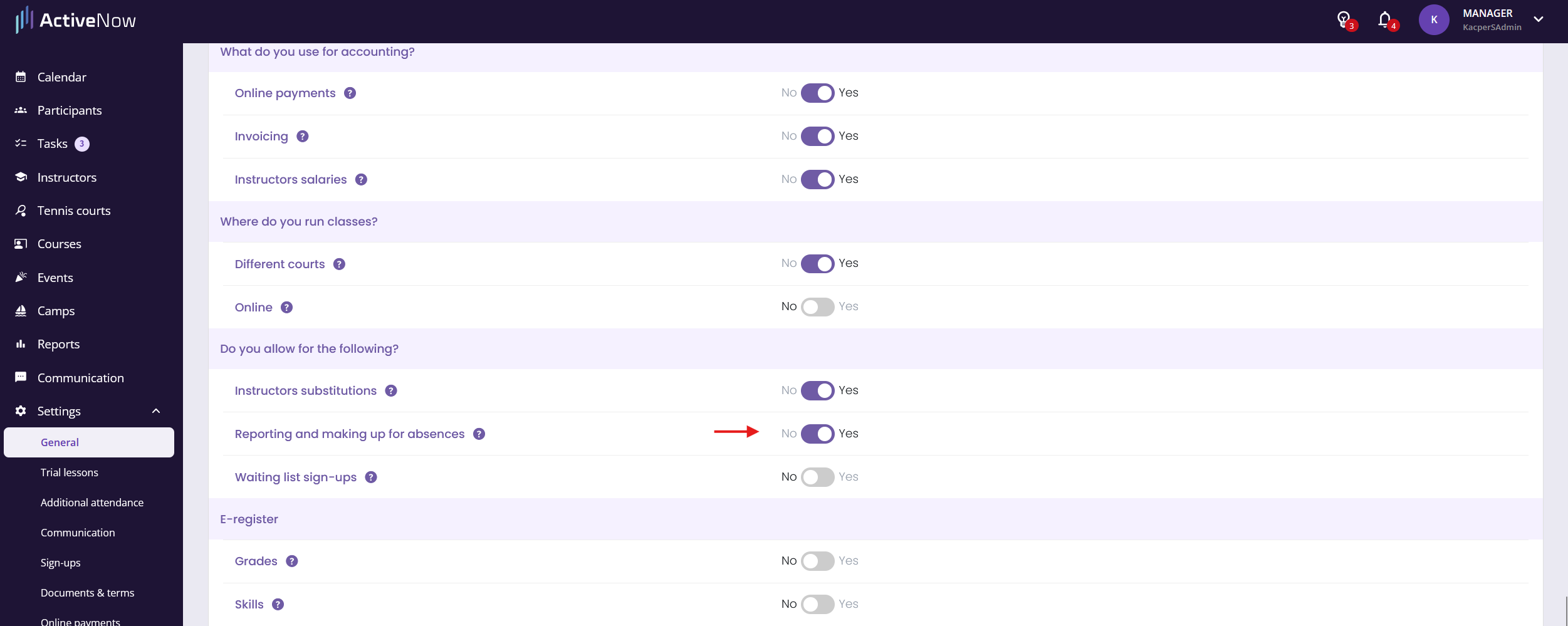
To allow participants to report absences and sign up for makeup classes, enable the option in **Settings → General** under **Additional features**.
Once enabled, refresh the page — a new **Making up absences** tab will appear at the top.
## Configuring the Making up absences tab
## Client self-service
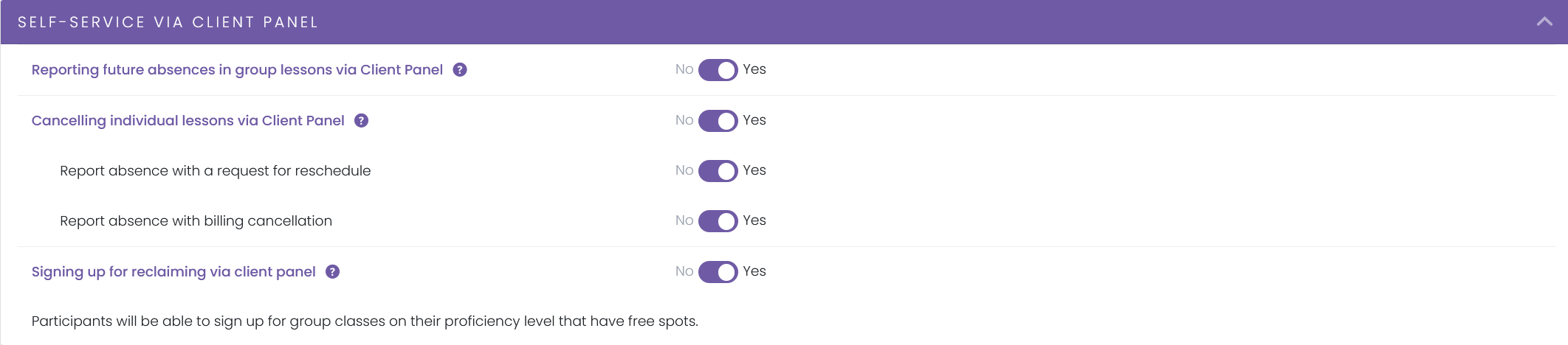
In this section you decide whether a client can:
* report their own absence in **group courses**
* report their own absence in **individual courses**
* with a **reschedule request**
* with **billing cancellation**
* **sign themselves up for a makeup class** at a different time in **group courses**
{% stepper %}
{% step %}
#### Group course absence rules
In the next section you set the **main rules** for reporting absences in group courses:
1. **When can an absence be reported correctly?** — Sets how far in advance a client must report an absence to receive an *impulse* entitling them to a makeup lesson. If the absence is reported **within the time limit**, the participant receives an *impulse*.
{% endstep %}
{% step %}
2\. **How many absences can be made up in group courses?** — Sets the maximum number of absences per course for which a client receives an *impulse*.
{% hint style="info" %}
You can change this limit for individual courses — go to the course details and find the *Making up absences* section. There you can set how many times participants can make up an absence in that course, and whether its lessons are available to participants from other courses as makeup slots.
{% endhint %}
{% hint style="info" %}
Instead of a global per-course limit, you can use a **monthly absence limit** — the number of allowed reports then resets every calendar month (based on the month the lesson takes place, not the month of reporting). To enable this option for your account, contact us.
{% endhint %}
{% endstep %}
{% step %}
3\. **How long is an impulse valid?** — Defines how long the client has to use an impulse. You can choose:
* until the end of the course
* for a set number of days from when the absence was reported
{% endstep %}
{% step %}
4\. **Cancelling a previous makeup sign-up** — Controls whether a client can cancel a makeup class they previously signed up for.
This works like a standard absence report — when the client cancels a makeup, one impulse is used. They can sign up again only if they have remaining impulses.

{% endstep %}
{% endstepper %}
## Signing up for a makeup class
A participant with an active *impulse* on their profile can sign up for a makeup class through the Client Panel. In the *Making up absences* tab they will find suggested available slots. Read more in the [Signing Up for a Makeup Class](/en/client-panel/reporting-absence.md) article.
The client can join any ongoing group lesson **that has available spots**. The lesson must have **the same level assigned as the participant's profile level**.
{% hint style="warning" %}
**Important:** For a client to sign up for a makeup class, the course must have an instructor assigned and must already be underway.
{% endhint %}
---
# Agent Instructions
This documentation is published with GitBook. GitBook is the documentation platform designed so that both humans and AI agents can read, navigate, and reason over technical content effectively. Learn more at gitbook.com.
## Querying This Documentation
If you need additional information that is not directly available in this page, you can query the documentation by asking a question.
Perform an HTTP GET request on the following URL with the `ask` and `goal` query parameters:
```
GET https://help.activenow.io/en/absences-and-makeup-classes/reporting-and-making-up-absences.md?ask=&goal=
```
`ask` is the immediate question: it should be specific, self-contained, and written in natural language.
`goal` is what the user is ultimately trying to achieve, the reason they need the answer. Sharing it helps GitBook give you a better, more relevant answer. A goal is most helpful when it describes the outcome the user wants rather than restating the question. For example, with `ask=how do I create an API token`, a goal like `automate deployments from our CI pipeline` lets GitBook tailor the answer to that use case.
The response will contain a direct answer to the question and relevant excerpts and sources from the documentation.
Use this mechanism when the answer is not explicitly present in the current page, you need clarification or additional context, or you want to retrieve related documentation sections.