> For the complete documentation index, see [llms.txt](https://help.activenow.io/llms.txt). Markdown versions of documentation pages are available by appending `.md` to page URLs; this page is available as [Markdown](https://help.activenow.io/en/client-management/signing-out-a-participant-from-a-group-course.md).
# Signing Out a Participant from a Group Course
Did a participant withdraw before the course started and you need to remove them completely? Or did someone decide to quit after the course had already begun?
In ActiveNow you can easily sign a participant out from a course in two ways: ***from a specific date*** or ***from the course beginning***. Both options are available in the ***Courses*** and ***Participants*** tabs.
## Signing out from the Participants tab
{% stepper %}
{% step %}
**Go to the Participants tab**
Open the *Participants* tab in the left menu.
{% endstep %}
{% step %}
**Select the participant**
Find and select the participant you want to sign out.
{% endstep %}
{% step %}
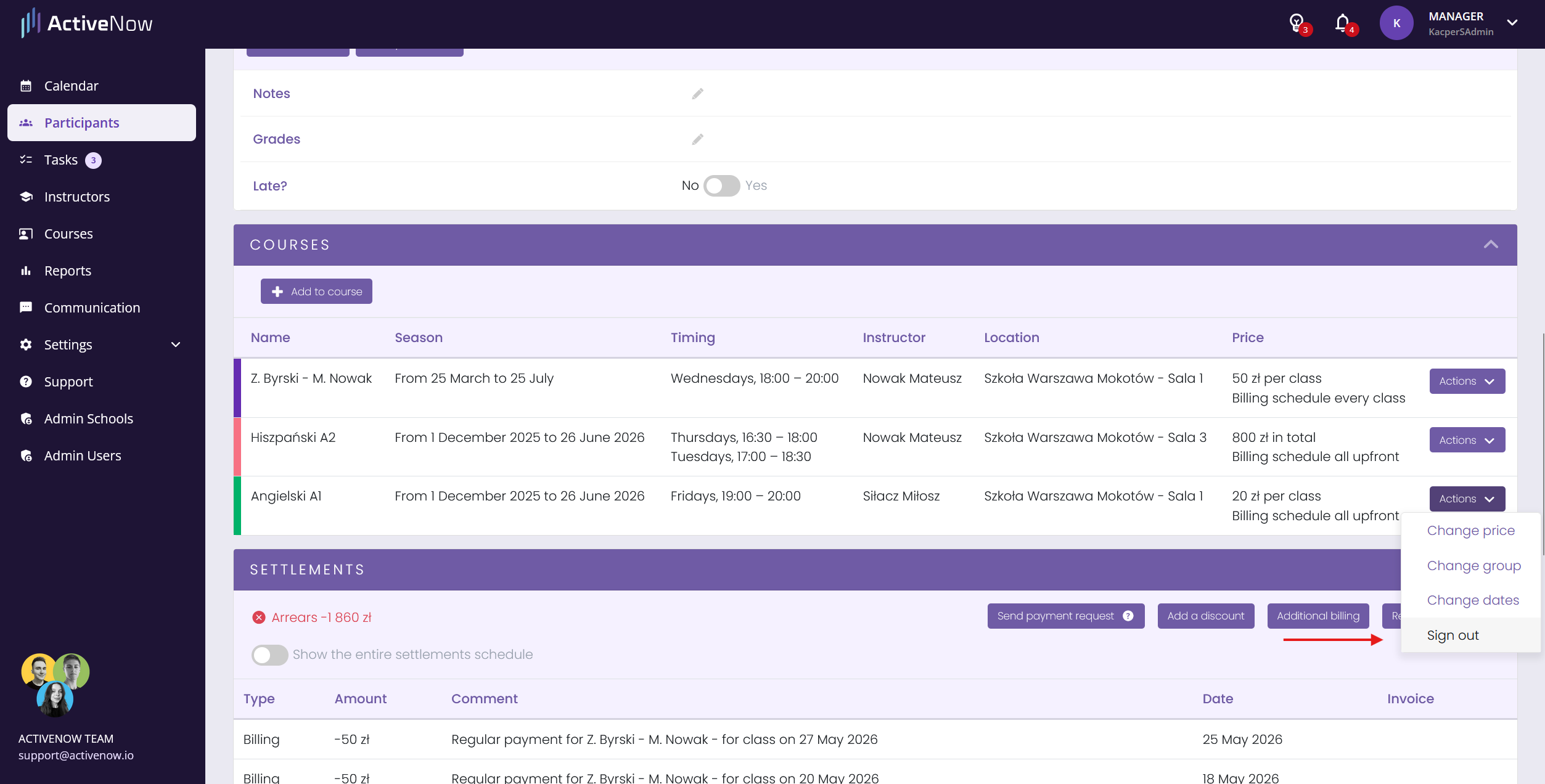
**Go to the Courses section**
In their profile, go to the *Courses* section.
{% endstep %}
{% step %}
**Sign out the participant**
Next to the course you want to sign them out from, click *Actions* → *Sign out*.
{% endstep %}
{% step %}
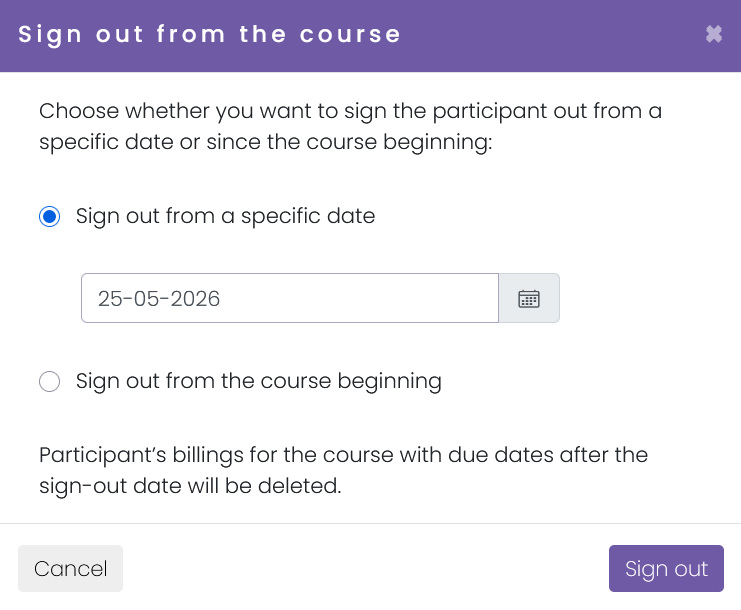
**Choose the sign-out option**
In the window, choose one of the two options:
* ***Sign out from the course beginning*** — to remove them completely from the start.
* ***Sign out from a specific date*** — if they should stop attending from a specific day. Enter the date of their last class.
{% endstep %}
{% step %}
**Save changes**
Confirm by clicking ***Sign out***.
{% endstep %}
{% endstepper %}
**Note:** For individual courses, instead of *Sign out* you will see *Finish course*.
## Signing out from the Courses tab
{% stepper %}
{% step %}
**Go to the Courses tab**
Go to the *Courses* tab and select the course you want to sign the participant out from.
{% endstep %}
{% step %}
**Find the Participants section**
Scroll down to the *Participants* section.
{% endstep %}
{% step %}
**Sign out the participant**
Next to the participant, click *Actions* → *Sign out*.
{% endstep %}
{% step %}
**Choose the sign-out option**
In the window, choose one of the two options:
* ***Sign out from the course beginning***
* ***Sign out from a specific date***
{% endstep %}
{% step %}
**Save changes**
Confirm by clicking ***Sign out***.
{% endstep %}
{% endstepper %}

## Where does a participant go after being signed out?
Once signed out, if the participant is no longer enrolled in any other courses, they will automatically be moved to the *Inactive* participants list.
## To view the list of inactive participants:
{% stepper %}
{% step %}
**Go to the Participants tab**
Open the *Participants* tab.
{% endstep %}
{% step %}
**Click Active**
In the top left corner, click the *Active* button.
{% endstep %}
{% step %}
**Select Inactive**
From the dropdown menu, select *Inactive* — you will see a list of participants not enrolled in any course.
{% endstep %}
{% endstepper %}
{% hint style="info" %}
The *Inactive* tab only appears when your account has **more than 50 participants**.
{% endhint %}
---
# Agent Instructions
This documentation is published with GitBook. GitBook is the documentation platform designed so that both humans and AI agents can read, navigate, and reason over technical content effectively. Learn more at gitbook.com.
## Querying This Documentation
If you need additional information that is not directly available in this page, you can query the documentation by asking a question.
Perform an HTTP GET request on the following URL with the `ask` and `goal` query parameters:
```
GET https://help.activenow.io/en/client-management/signing-out-a-participant-from-a-group-course.md?ask=&goal=
```
`ask` is the immediate question: it should be specific, self-contained, and written in natural language.
`goal` is what the user is ultimately trying to achieve, the reason they need the answer. Sharing it helps GitBook give you a better, more relevant answer. A goal is most helpful when it describes the outcome the user wants rather than restating the question. For example, with `ask=how do I create an API token`, a goal like `automate deployments from our CI pipeline` lets GitBook tailor the answer to that use case.
The response will contain a direct answer to the question and relevant excerpts and sources from the documentation.
Use this mechanism when the answer is not explicitly present in the current page, you need clarification or additional context, or you want to retrieve related documentation sections.