> For the complete documentation index, see [llms.txt](https://help.activenow.io/llms.txt). Markdown versions of documentation pages are available by appending `.md` to page URLs; this page is available as [Markdown](https://help.activenow.io/en/getting-started/managing-proficiency-levels.md).
# Configuring Your School's Offer
Do you teach children, adults, or both? In *Settings → Your Offer* you can define who you teach and which disciplines you offer, set up proficiency levels, and turn on the activity types you run. The rest of the system adapts automatically — from the sign-up form to how courses are classified.
## School target audience
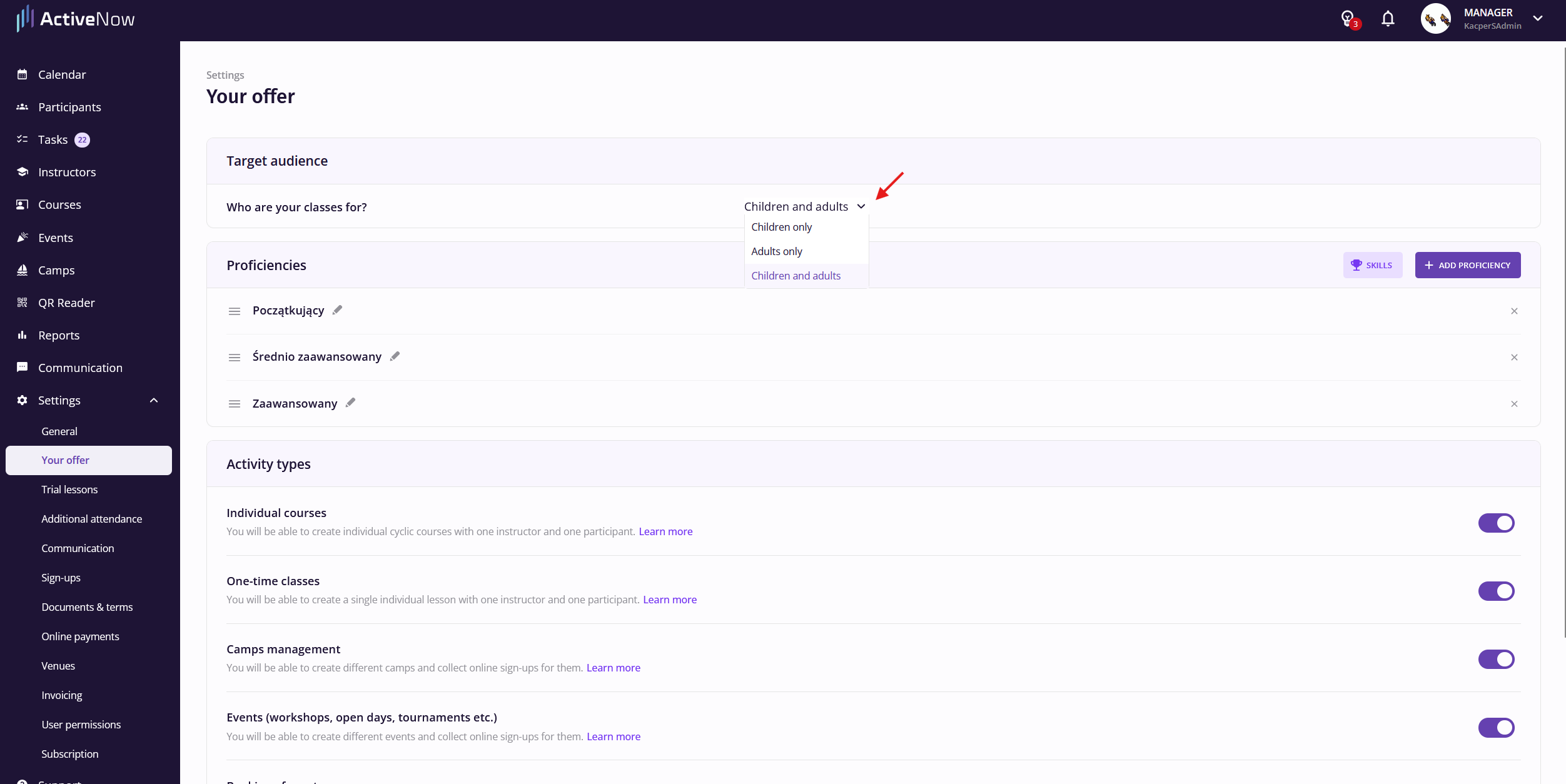
Go to *Settings → Your Offer* and select one of the options in the *Target audience* section:
* **Children only** — all group courses are automatically classified as "for children"; parent fields in the sign-up form are always required.
* **Adults only** — all courses are classified as "for adults"; parent fields are hidden.
* **Children and adults** — you can assign each group course its own age group: *Children*, *Adults*, or *Children and adults* (mixed). An automatic *Age* filter will then appear in the sign-up table to help clients quickly find the right classes.
{% hint style="info" %}
If you teach only one age group ("Children only" or "Adults only"), the age group option does not appear when creating courses — the system assigns it automatically.
{% endhint %}
## Disciplines
Do you teach swimming, dance, or maybe languages? Disciplines let you tag your group and individual courses, so participants find what they're looking for faster and you can filter your own course list more easily.
Go to *Settings → Your Offer*. In the *Disciplines* section, click *Add Discipline*.
Click *Search* to find the disciplines you teach — select them with the checkbox and click *Confirm*.
{% hint style="info" %}
Can't find a discipline that matches your offer? Email us at and let us know which discipline you're missing.
{% endhint %}
If you stop teaching a discipline, remove it from the list. Courses that already have that discipline assigned will keep it — it just disappears from the selection lists for new courses.
{% hint style="info" %}
When creating a new group or individual course, you'll assign its discipline in the *Offer Details* section (if the course doesn't match any of them, choose *None*).
{% endhint %}
Once you've assigned disciplines to your courses, a matching filter will appear in the sign-up table, helping participants find the classes they're interested in faster.
## Proficiency levels
By default, ActiveNow includes three proficiency levels: Beginner, Intermediate, and Advanced. If you use different names at your school or categorise participants differently, you can change this.
Go to *Settings → Your Offer*. In the *Proficiency* section, click *Edit*.
Here you can rename levels, add new ones, or reorder them. When you're done, click *Save*.
If a level is no longer used at your school, you can delete it at any time. Courses previously assigned to that level will be preserved, but the level will no longer appear when creating new courses or adding participants.
{% hint style="info" %}
Proficiency levels are visible to participants when signing up for courses. Well-named levels help participants assess where they stand on their own — and choose the right course without having to contact the school.
{% endhint %}
{% hint style="warning" %}
A participant's proficiency level is updated automatically when they are added to a course with a given proficiency level assigned.
{% endhint %}
If you use the **Skills** feature, you'll find a *Skills* button next to each level — it opens the skills configuration in a new interface. More about assigning skills to participants in the [Assigning Skills to Participants](/en/client-management/managing-participant-skills.md) article.

## Enabling activity types
In *Your Offer* you can also enable the types of activities you offer:
* **Individual courses** → [Collecting Sign-Ups for Individual Courses](/en/online-sign-ups/individual-course-sign-up-form.md)
* **Trial lessons** → [Collecting Sign-Ups for Trial Lessons](/en/online-sign-ups/trial-lessons.md)
* **Camps and holiday programmes** → [Camps — Sign-Ups and Management](/en/camps-and-events/camps-sign-ups-and-management.md)
* **Events** → [Managing Sign-Ups and Events](/en/camps-and-events/managing-events.md)
Enabling an activity type makes the relevant section appear in your panel and sign-up forms.
---
# Agent Instructions
This documentation is published with GitBook. GitBook is the documentation platform designed so that both humans and AI agents can read, navigate, and reason over technical content effectively. Learn more at gitbook.com.
## Querying This Documentation
If you need additional information that is not directly available in this page, you can query the documentation by asking a question.
Perform an HTTP GET request on the following URL with the `ask` and `goal` query parameters:
```
GET https://help.activenow.io/en/getting-started/managing-proficiency-levels.md?ask=&goal=
```
`ask` is the immediate question: it should be specific, self-contained, and written in natural language.
`goal` is what the user is ultimately trying to achieve, the reason they need the answer. Sharing it helps GitBook give you a better, more relevant answer. A goal is most helpful when it describes the outcome the user wants rather than restating the question. For example, with `ask=how do I create an API token`, a goal like `automate deployments from our CI pipeline` lets GitBook tailor the answer to that use case.
The response will contain a direct answer to the question and relevant excerpts and sources from the documentation.
Use this mechanism when the answer is not explicitly present in the current page, you need clarification or additional context, or you want to retrieve related documentation sections.