> For the complete documentation index, see [llms.txt](https://help.activenow.io/llms.txt). Markdown versions of documentation pages are available by appending `.md` to page URLs; this page is available as [Markdown](https://help.activenow.io/panel-prowadzacego/integracja-activenow-z-kalendarzami-zewnetrznymi-google-outlook-apple.md).
# Synchronizacja ActiveNow z kalendarzem Google, Outlook oraz Apple
Chcesz zsynchronizować swój grafik z Google Calendar, Outlookiem lub Apple Calendar? W kilku krokach połączysz harmonogram z panelu prowadzącego z wybranym kalendarzem zewnętrznym.
## Jak zintegrować kalendarz
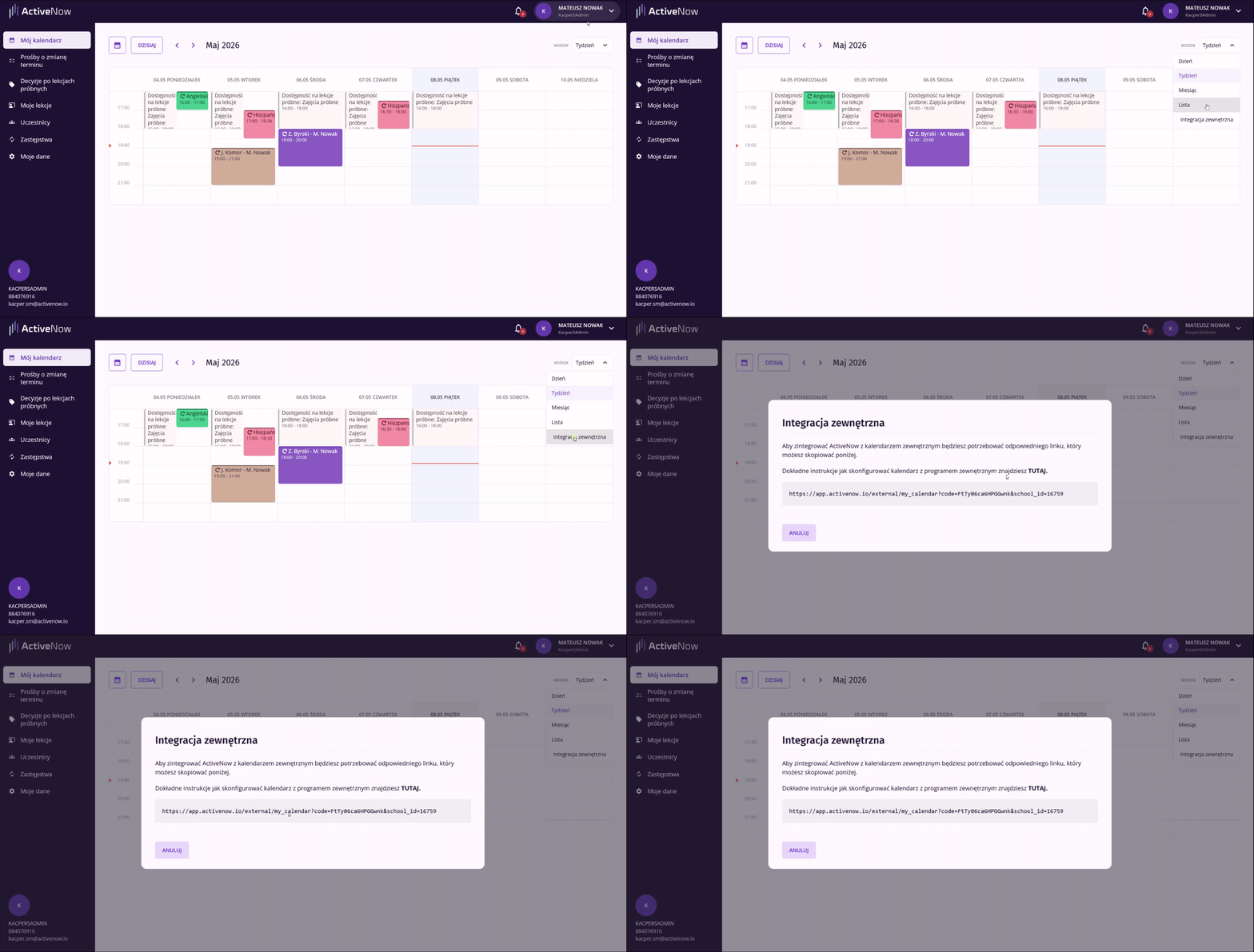
Integracja odbywa się przy użyciu linku. Znajdziesz go w zakładce ***Mój kalendarz*** w ActiveNow — kliknij przycisk ***Widok*** w prawym górnym rogu i wybierz ***Integracja zewnętrzna***.
W oknie, które się pojawi, skopiuj link do integracji.
Skopiowany link wklej w odpowiednim miejscu w wybranym kalendarzu. Jeśli potrzebujesz pomocy, skorzystaj z instrukcji dla swojego kalendarza:
* **Google** → [Dodawanie kalendarza publicznego przy użyciu linku](https://support.google.com/calendar/answer/37100?hl=pl\&co=GENIE.Platform%3DDesktop\&oco=1)
* **Microsoft Outlook** → [Dodawanie i importowanie kalendarzy](https://support.microsoft.com/pl-pl/office/importuj-kalendarze-do-programu-outlook-8e8364e1-400e-4c0f-a573-fe76b5a2d379)
* **Apple** → [Konfigurowanie wielu kalendarzy na iPhonie](https://support.apple.com/pl-pl/guide/iphone/iph3d1110d4/ios)
Po zintegrowaniu kursy z Twojego grafiku w panelu prowadzącego będą widoczne w kalendarzu zewnętrznym.
{% hint style="warning" %}
Zmiany w kalendarzu zewnętrznym będą widoczne po jego odświeżeniu — czas aktualizacji zależy od dostawcy kalendarza.
Zmiany wprowadzone w kalendarzu zewnętrznym **nie są** synchronizowane z ActiveNow. Aby edytować termin lekcji, zawsze rób to po stronie systemu.
{% endhint %}
---
# Agent Instructions
This documentation is published with GitBook. GitBook is the documentation platform designed so that both humans and AI agents can read, navigate, and reason over technical content effectively. Learn more at gitbook.com.
## Querying This Documentation
If you need additional information that is not directly available in this page, you can query the documentation by asking a question.
Perform an HTTP GET request on the following URL with the `ask` and `goal` query parameters:
```
GET https://help.activenow.io/panel-prowadzacego/integracja-activenow-z-kalendarzami-zewnetrznymi-google-outlook-apple.md?ask=&goal=
```
`ask` is the immediate question: it should be specific, self-contained, and written in natural language.
`goal` is what the user is ultimately trying to achieve, the reason they need the answer. Sharing it helps GitBook give you a better, more relevant answer. A goal is most helpful when it describes the outcome the user wants rather than restating the question. For example, with `ask=how do I create an API token`, a goal like `automate deployments from our CI pipeline` lets GitBook tailor the answer to that use case.
The response will contain a direct answer to the question and relevant excerpts and sources from the documentation.
Use this mechanism when the answer is not explicitly present in the current page, you need clarification or additional context, or you want to retrieve related documentation sections.