> For the complete documentation index, see [llms.txt](https://help.activenow.io/llms.txt). Markdown versions of documentation pages are available by appending `.md` to page URLs; this page is available as [Markdown](https://help.activenow.io/zapisy-online/osadzanie-formularza-z-filtrem.md).
# Osadzanie formularza zapisów dla wybranej lokalizacji, poziomu lub grupy wiekowej
Masz kilka lokalizacji i chcesz, żeby każda miała na stronie swoją zakładkę z zapisami? Chcesz pokazać formularz tylko dla dzieci albo tylko dla dorosłych? W ActiveNow możesz wygenerować osobny kod osadzenia dla dowolnej kombinacji filtrów — bez żadnej dodatkowej konfiguracji.
## Jak wygenerować kod z filtrem
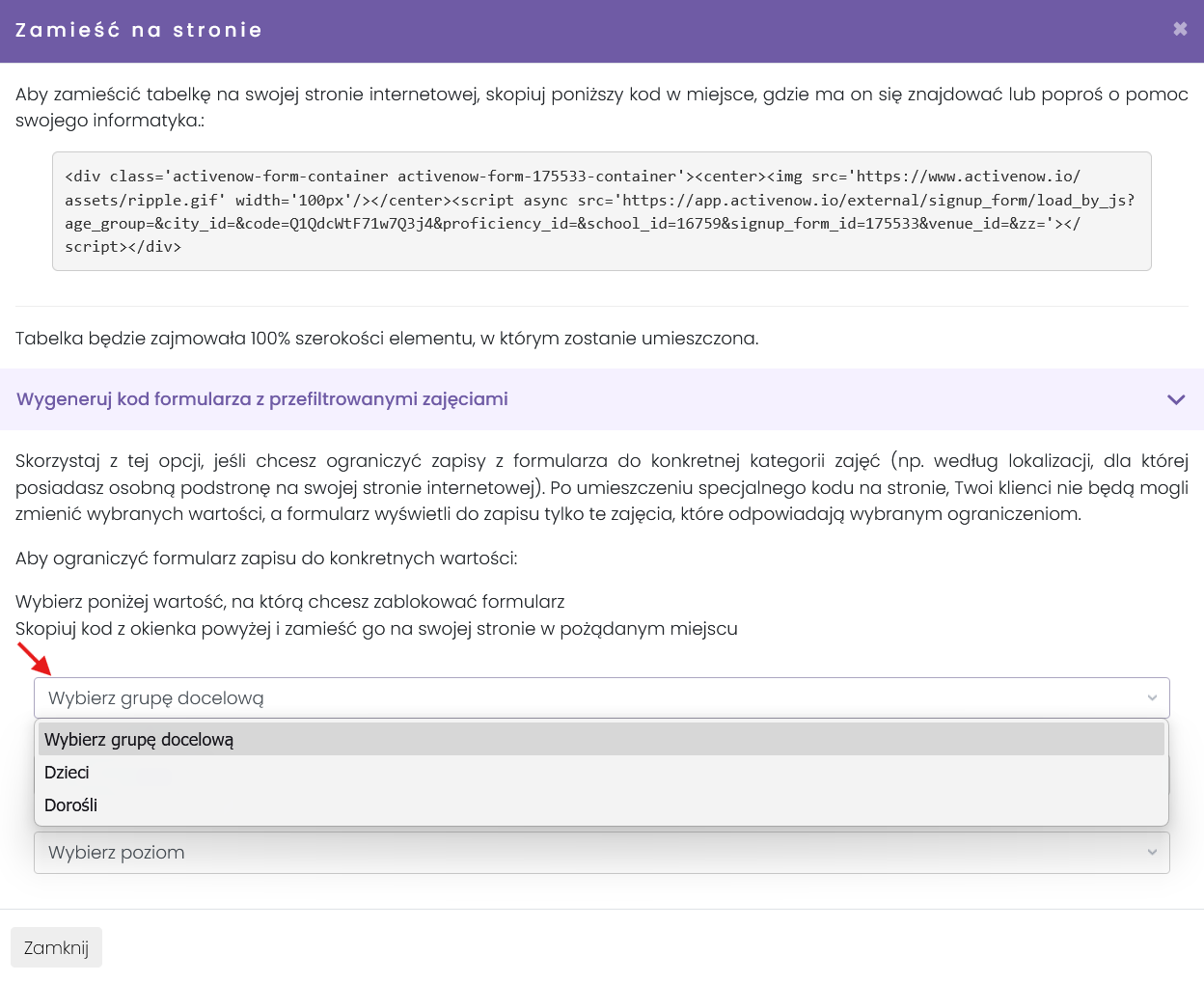
Przejdź do *Ustawienia → Zapisy* i kliknij *Zamieść na stronie* przy wybranym formularzu. Pod kodem osadzenia znajdziesz sekcję **Wygeneruj kod formularza z przefiltrowanymi zajęciami** — kliknij ją, żeby rozwinąć.
Wybierz wartości filtrów, które mają obowiązywać:
* **Kursy grupowe** — lokalizacja, poziom lub **grupa wiekowa** (dzieci / dorośli)
* **Kursy indywidualne** — lokalizacja lub prowadzący
* **Obozy i półkolonie** — lokalizacja lub poziom
* **Wydarzenia** — lokalizacja lub typ wydarzenia
Po wybraniu parametrów kod osadzenia w górnej części okna zmieni się automatycznie. Skopiuj go i wklej na swojej stronie — formularz będzie pokazywał tylko zajęcia spełniające wybrane kryteria.
{% hint style="info" %}
Tabelka zablokowana na grupę "dzieci" wyświetli również kursy oznaczone jako "dzieci i dorośli" (mieszane) — na takie kursy można bowiem zapisać zarówno dziecko, jak i dorosłego.
{% endhint %}
{% hint style="info" %}
Filtrowanie wydarzeń po typie wydarzenia jest dostępne po kontakcie z nami.
{% endhint %}
---
# Agent Instructions
This documentation is published with GitBook. GitBook is the documentation platform designed so that both humans and AI agents can read, navigate, and reason over technical content effectively. Learn more at gitbook.com.
## Querying This Documentation
If you need additional information that is not directly available in this page, you can query the documentation by asking a question.
Perform an HTTP GET request on the following URL with the `ask` and `goal` query parameters:
```
GET https://help.activenow.io/zapisy-online/osadzanie-formularza-z-filtrem.md?ask=&goal=
```
`ask` is the immediate question: it should be specific, self-contained, and written in natural language.
`goal` is what the user is ultimately trying to achieve, the reason they need the answer. Sharing it helps GitBook give you a better, more relevant answer. A goal is most helpful when it describes the outcome the user wants rather than restating the question. For example, with `ask=how do I create an API token`, a goal like `automate deployments from our CI pipeline` lets GitBook tailor the answer to that use case.
The response will contain a direct answer to the question and relevant excerpts and sources from the documentation.
Use this mechanism when the answer is not explicitly present in the current page, you need clarification or additional context, or you want to retrieve related documentation sections.