> For the complete documentation index, see [llms.txt](https://help.activenow.io/llms.txt). Markdown versions of documentation pages are available by appending `.md` to page URLs; this page is available as [Markdown](https://help.activenow.io/zarzadzanie-prowadzacymi/prowadzacy-nie-otrzymal-powiadomienia-sms.md).
# Prowadzący nie otrzymał powiadomienia SMS
Jeśli masz włączone powiadomienia SMS dla prowadzących, a prowadzący twierdzi, że nie dostał wiadomości o zgłoszonej nieobecności, odwołaniu lekcji lub zapisie na odrabianie — sprawdź dwie rzeczy.
## Sprawdź numer telefonu prowadzącego
Przejdź do zakładki *Prowadzący* i otwórz profil prowadzącego. Upewnij się, że pole *Numer telefonu* jest wypełnione i zawiera poprawny numer.
Jeśli numer jest błędny lub brakuje go w profilu — uzupełnij go i poproś prowadzącego, żeby sprawdził, czy kolejne powiadomienia już docierają.
## Sprawdź liczbę punktów SMS na koncie
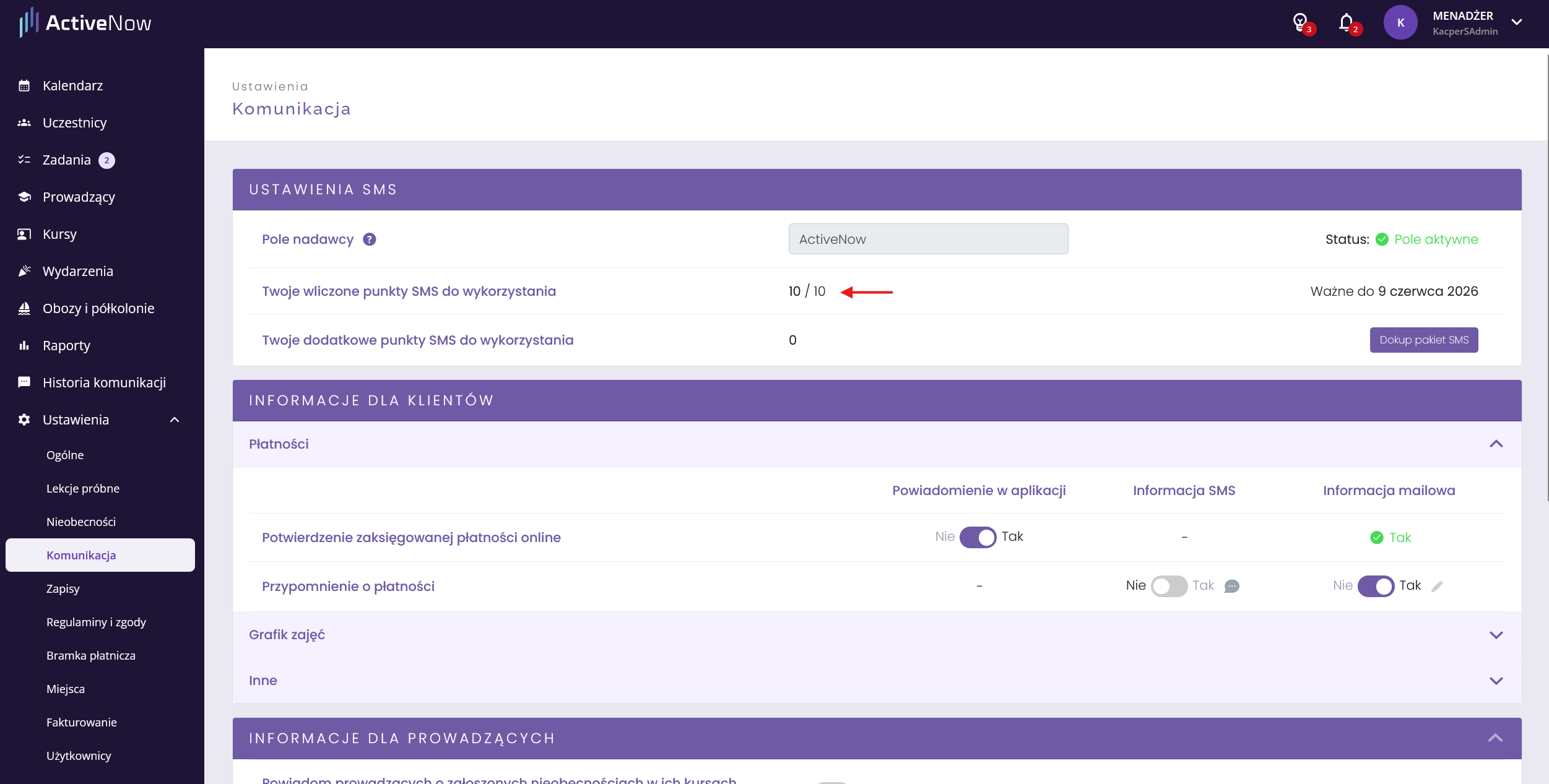
Jeśli prowadzący do tej pory otrzymywał powiadomienia, a nagle przestał — przyczyną może być brak punktów SMS na koncie. SMSy wysyłamy, pobierając punkty z Twojej puli. Gdy się skończą, wiadomości przestają być wysyłane.
Przejdź do ***Ustawienia → Komunikacja*** i sprawdź sekcję ***Ustawienia SMS***. Zobaczysz tam liczbę dostępnych punktów.
Jeśli punkty się skończyły, możesz dokupić nowy pakiet — przeczytasz o tym [tutaj](/komunikacja/zakup-dodatkowego-pakietu-sms.md).
---
# Agent Instructions
This documentation is published with GitBook. GitBook is the documentation platform designed so that both humans and AI agents can read, navigate, and reason over technical content effectively. Learn more at gitbook.com.
## Querying This Documentation
If you need additional information that is not directly available in this page, you can query the documentation by asking a question.
Perform an HTTP GET request on the following URL with the `ask` and `goal` query parameters:
```
GET https://help.activenow.io/zarzadzanie-prowadzacymi/prowadzacy-nie-otrzymal-powiadomienia-sms.md?ask=&goal=
```
`ask` is the immediate question: it should be specific, self-contained, and written in natural language.
`goal` is what the user is ultimately trying to achieve, the reason they need the answer. Sharing it helps GitBook give you a better, more relevant answer. A goal is most helpful when it describes the outcome the user wants rather than restating the question. For example, with `ask=how do I create an API token`, a goal like `automate deployments from our CI pipeline` lets GitBook tailor the answer to that use case.
The response will contain a direct answer to the question and relevant excerpts and sources from the documentation.
Use this mechanism when the answer is not explicitly present in the current page, you need clarification or additional context, or you want to retrieve related documentation sections.